
Zoho has rolled out major enhancements to Zoho One, its business operating system platform, shifting the focus from a standalone, app-centric model to a more integrated user workflow and a unified functional platform. This update introduces a redesigned user interface and expanded intelligence/AI tools.
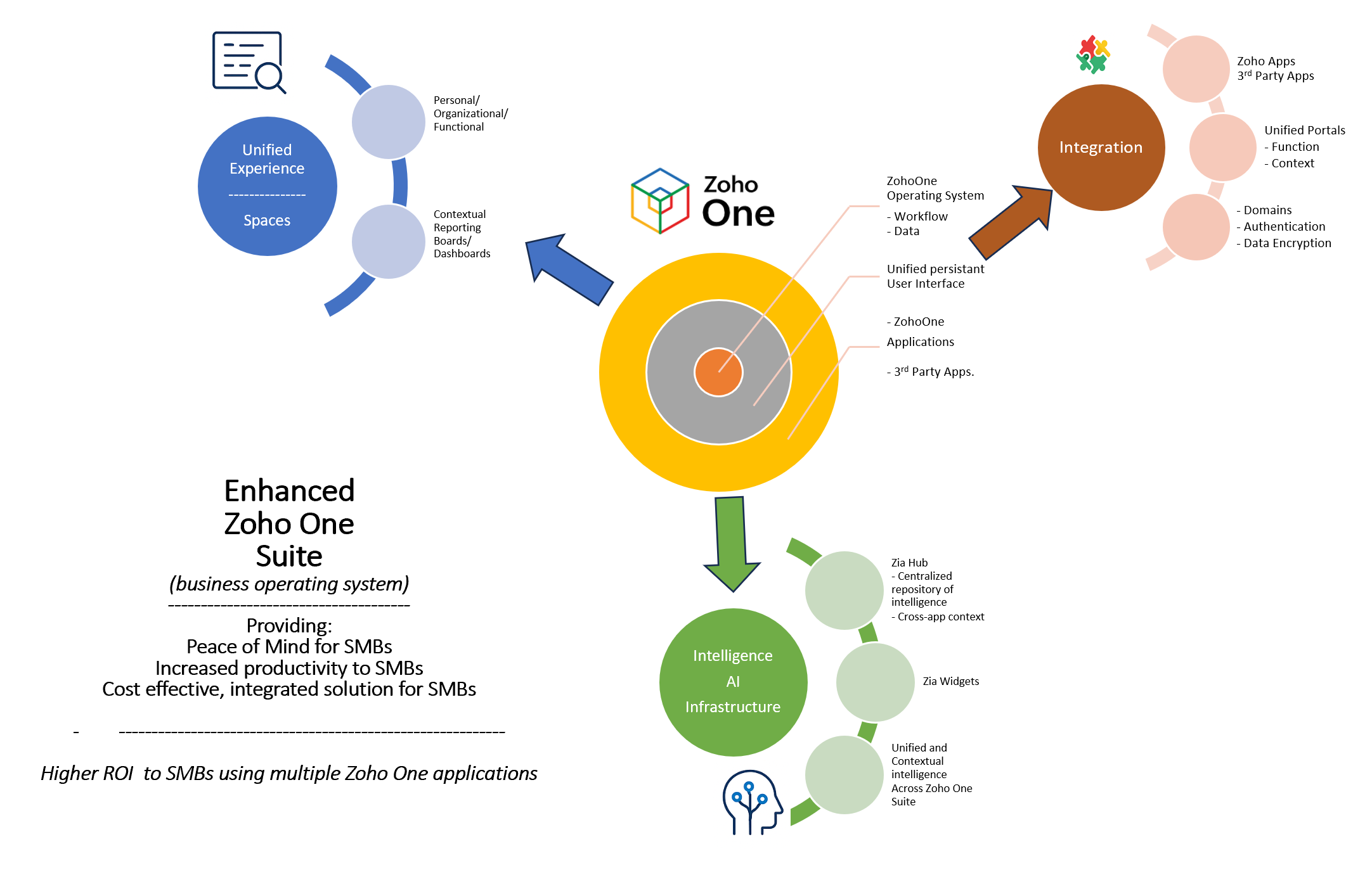
A. “Spaces” User Experience
Spaces is a major enhancement in the Zoho One 2025 update, designed to unify the user experience across personal, organizational, and functional contexts while maintaining flexibility for third-party integrations. This reduces context-switching by organizing applications provisioned for teams and relevant, compartmentalized work environments.
Key Features of Zoho One Spaces
Zoho One now groups applications into three primary types of “Spaces,” accessible from a unified navigation bar, making it easy to use the applications.
- Personal Space: This consolidates an individual’s productivity apps such as Mail, Calendar, and Tasks.
- Organizational Space: This supports company-wide communication and collaboration tools, such as Forums, Town Hall, and Feeds.
- Functional Space: These are role-specific spaces that group relevant apps for specific departments, such as HR, Marketing, Sales, or Finance.
The Spaces toolbar includes:
- A centralized search function from which users can access any information across the company that they’re authorized to view. Zia enables this functionality.
- A New Action Panel that allows users to build a view of their day, including tasks, approvals, scheduled meetings, emails, regardless of the app they’re currently using.
Quick navigation through dashboards and boards that pull together widgets across apps and third-party tools.
B. Deeper Integrations
An integration panel enables administrators to view and manage integration between Zoho One applications and Zoho One and third-party tools.
These include:
- The “Unified Integrations” panel in Zoho One admin settings where the admin can view and manage all integrations — whether between Zoho apps, Zoho-to-third-party apps, or even third-party to third-party apps. This provides a complete overview and centralized control instead of patching things together manually.
- A “Unified Portal” that helps consolidate different application portals (Zoho or third-party) into one screen. For users, that means less switching and more coherence.
- Repetitive setup enabled in multiple apps — like domain verification authentication and security. These are streamlined by centrally configuring once, and it can be applied across all relevant apps.
- Development of standardized workflows for apps that can be enabled or revoked in one go, helping maintain security and governance.
C. Platform-Wide AI & Content Intelligence with Zia
The AI assistant Zia is now more deeply embedded across Zoho One. It can aggregate and contextualize information from multiple Zoho One apps and third-party tools to provide unified insights and support decision making.
A new content-management component, “Zia Hubs,” provides a central space where contracts, meeting recordings, documents, and other assets are automatically organized and searchable. This makes it easier to surface relevant information without switching between tools.
Through a bottom toolbar within Zoho One, the “Ask Zia” interface allows natural-language searches across the entire platform.
Implications for SMBs
- For existing and new Zoho One customers, the Enhanced Zoho One platform provides users with smoother navigation and less friction.
- Better integration between Zoho One tools and between Zoho One and third-party tools. Over time this will lead to reduction in number of third-party tools used.
- For IT admin teams, the centralized integration and unified portal management reduces the complexity of provisioning and managing many Zoho One and third-party tools; it simplifies compliance/security and saves management time.
- For businesses that use a lot of apps and data, Zia Hubs and Ask Zia enable tracking and make retrieving information easier and faster.
- Zoho made a very significant functionality update of Zoho One — better unified experience, deeper integration, AI, stronger security — the Zoho One pricing model(Flexible-User vs All-Employee) and per-user prices remains the same.
- The enhanced Zoho One platform promises to drive strong return-on-investment (ROI) to small and medium businesses (SMBs).
Building the Case for Strong ROI for SMBs
The enhanced Zoho One will yield higher ROI for SMBs.
Key Enablers for Increased ROI
- A unified experience through Spaces reduces context switching between applications. The unified user interface enables the user to access personal, organizational, and functional applications and workflows. Advantages include:
-
- Time saved by reducing context switching between applications
- Improved productivity by quicker navigation between applications, both Zoho One and third-party applications
- Reduced number of third-party applications used (for example, collaboration whiteboarding tools, task and project management tools, and knowledge management tools, etc.) since several of them are now enabled through the Enhanced Zoho One business suite.
-
- Unified integrations provide a complete overview and centralized control instead of patching things together manually. This helps lower IT load and overhead. They provide:
-
- Increased Admin and IT savings
- Improved functional efficiency and decision making
-
- Repetitive setup enabled in multiple apps for domain verification, authentication, security, etc. This results in:
-
- Reduced security and admin overhead
-
- Ask Zia aggregates and contextualizes information from multiple Zoho One apps and third-party tools to provide unified insights and support decision making.
-
- Improved operational efficiency
-
- Zia Hubs provides intelligence from contracts, PDFs, calls, etc. This makes it easier and faster to surface relevant information without switching between tools.
-
- Time saved due to speed and efficiency
- Improved operational efficiency
-
Overall, the biggest gains will come from reduction in time spent switching between apps, searching for information and managing unstructured content.